GPT-6 Astra and Archicad in 2026: What Actually Connects, and Why 73 API Commands Cannot Build a Single Wall
Can GPT-6 Astra control Archicad? Graphisoft's native JSON API has 73 commands, and not one of them creates, moves or deletes a building element. What works anyway, how Archicad's own AI Assistant fits in, and where automation actually saves a Swiss firm time.
The short answer: GPT-6 Astra cannot operate Archicad, and the reason lies with Archicad, not with Astra. Graphisoft's official interface knows 73 commands, and not one of them creates, moves or deletes a building element. Everything that looks like "AI builds my model" runs through an open-source add-on that does not come from Graphisoft. What is possible after that is a surprising amount. Just not the thing in the headlines.
Since Astra arrived at the beginning of September, this question has come up in every second conversation I have with an architecture firm, almost always in the same form: "We saw that the new AI can operate a computer. Does that work with Archicad?" And almost always a second question is folded inside it, unspoken, because both things appeared in the same month: what does this have to do with the AI Assistant built into Archicad since version 29?
For this article I went and looked at the interfaces myself rather than writing about possibilities. The result is both more sobering and more useful than I expected.
Three things that get confused under "GPT Astra Archicad"
Most of the confusion disappears the moment you separate these three. They barely overlap.
| What it is | What it does | Who supplies it | |
|---|---|---|---|
| Archicad AI Assistant | A feature in Archicad 29, beta | Questions about the software, standards lookup, natural-language element selection | Graphisoft, model undisclosed |
| Astra in the chat | ChatGPT running GPT-6 Astra | Text, scripts, reading plans, images, 3D via Blender | OpenAI, your subscription |
| Astra at the model | Astra through an MCP server on the JSON interface | Query and report; with an add-on, build too | Community projects on GitHub |
The third row is what this article is about, and the one almost nobody writes about.
Does Archicad's AI Assistant run on GPT-6 Astra?
No. And the answer is more precise than the official product page suggests.
That page still names no model: no OpenAI, no Anthropic, no Google, no claim of a model of their own. For a tool used in a profession that carries professional indemnity insurance, that is a notable gap. It was said out loud anyway, just somewhere else: in late January 2026 a Graphisoft product designer answered exactly this question in the company's own community forum — the assistant uses Google's Gemini 2.5 Flash for its answers; generated images come from a separate diffusion model inside AI Visualizer.
Two caveats belong with that. First, it is a forum reply from an employee, not a product specification. Second, it is dated: there is no newer official statement confirming the same model is still in service today. What can be settled from it is the original question — at the time of the only disclosure, Archicad's AI Assistant was not running on an OpenAI model, and certainly not on GPT-6 Astra, which did not yet exist. Anyone googling the two names together is looking for a connection that never existed at this level.
What the page does state clearly is the scope, and it is narrower than the name suggests. The assistant answers questions about tools and workflows, looks up building standards (starting with the UK), selects elements in the 2D and 3D windows using natural language, and drives AI Visualizer 2.0 for concept images. It is labelled beta and included in the Collaborate and Studio plans.
Graphisoft is unusually open about the limits, and they are revealing:
- no selection in sections and elevations, only in the floor plan and the 3D window
- no custom properties, only Archicad's built-in ones
- no selection by fill or line type name
- nothing without an internet connection
Read that list again. An assistant that only knows built-in properties is substantially constrained for a firm that organises its elements through custom properties — that is, for any firm with a BIM standard. And it selects. It does not build anything and it does not change anything.
Two things sit out there as "coming soon", and both are more interesting than what ships today: MCP support, so the assistant can work more directly with the live project model, and an Iterative Design Engine meant to generate multiple massing and layout options automatically in early design. That is Graphisoft announcing it wants to go exactly where the community projects already are. None of it has shipped, and the Design Engine has no date at all — it hangs off Graphisoft's Design Intelligence Platform strategy, not off any Archicad version. For Archicad 30, announced for early October, Graphisoft so far confirms a single AI change: AI Visualizer 3.0.
One point speaks clearly in favour of the built-in route: Graphisoft states that no user-generated or project-specific content is used to train AI models. That is a different starting point from an individual subscription with a chat provider. What remains open is which subprocessor actually handles the requests, as long as the model goes unnamed.
Incidentally, because this is also perpetually confused: the AI Visualizer is not the AI Assistant, and it came long before. It runs on Stable Diffusion, a licensed image model; it arrived in November 2023 with Archicad 27, running locally on your own graphics card, moved to the cloud with version 28, and is at version 2.0 in Archicad 29. It makes images, not geometry.
The boundary that explains everything: 73 commands, and none builds a wall
This is where it gets technical, and where the real answer lives.
Archicad has shipped its own interface since version 24. It listens locally on a port between 19723 and 19743, speaks JSON over HTTP, and there is an official Python package for it. Anything addressing it is talking to a running Archicad session on the same machine.
That interface comprises 73 commands. I went through the complete list, because I wanted to know exactly where the boundary falls. It falls in a very unambiguous place:
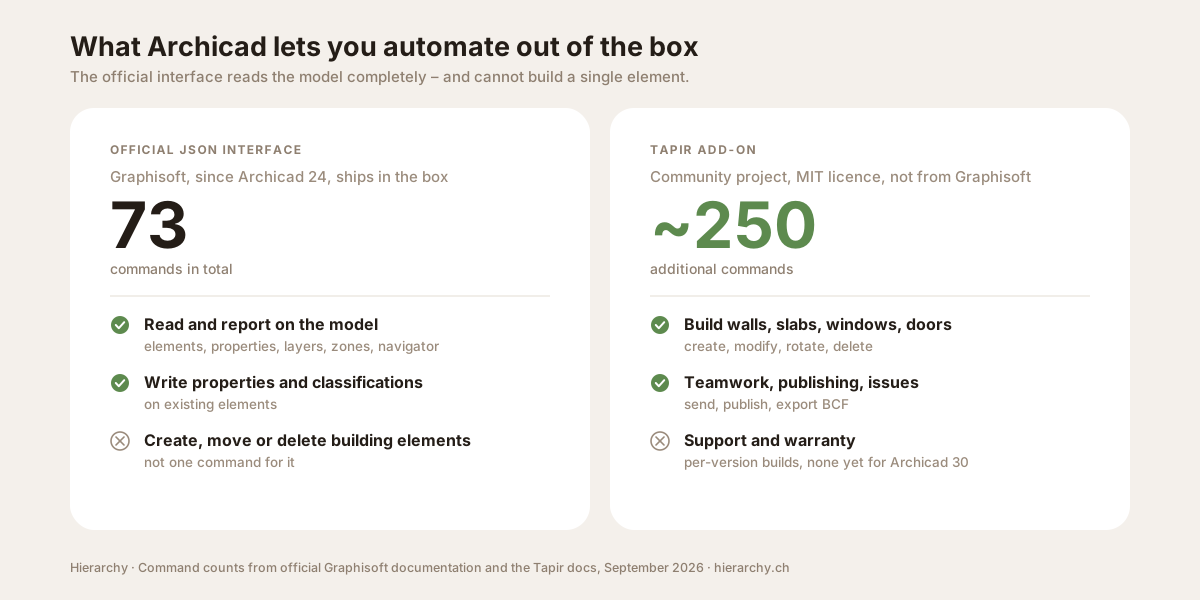
What it can read is essentially everything: all elements, selected elements, elements by type and by classification, every property value, layers, composites, surfaces, building materials, profiles, zone categories, pen sets, the Navigator structure, bounding boxes in 2D and 3D, which elements belong to which zone, and the components of composite elements.
What it can write is four things, and none of them is geometry:
- Property values on existing elements. That command is the most important one in the entire interface.
- Classifications on existing elements.
- Attributes and their folders: create, rename, move and delete layers, building materials, composites and surfaces.
- Structure rather than substance: Navigator items, Layout Book layouts, view map folders.
I counted through the command list: of the 73 commands, 15 have any writing effect at all, and exactly two of those touch a building element — the one for property values and the one for classifications.
No Teamwork commands. No issue management. No publishing. Those simply are not in there.
This boundary is not an oversight but a design decision: Graphisoft built a reporting interface, not a modelling interface. For the question "can Astra control Archicad?", the honest answer therefore splits in two. Reading, checking and reporting on your model: yes, today, with the official interface. Changing your model: not with what ships in the box.
Tapir: the bridge the whole automation story stands on
The gap is filled by an open-source add-on called Tapir. It hooks into the extension mechanism of the official interface and brings roughly 250 additional commands, which I counted in the source — precisely the ones missing above:
- Create: walls, columns, beams, slabs, roofs, stairs, windows, doors, openings, morphs, zones, objects, lamps, railings, polylines, splines
- Modify and transform: move, rotate, delete, lock, read and set GDL parameters on elements, find connected elements, check collisions
- Teamwork: send, receive, reserve, release
- Publishing: publish publisher sets, update drawings, create sections and interior elevations, create layouts
- Issues: create, read, attach elements, export and import BCF
- Plus: revisions, design options, keynotes, hotlinks, dimensioning, MEP elements, favourites and IFC operations
That is a complete automation layer, and it is well made. You should simply know what you are standing on. Tapir is a community project under the MIT licence, built on GitHub since 2022 and carried at its core by very few people. It is actively maintained, releases land roughly monthly, and there are dedicated builds for Archicad 25 through 29. At the time of writing there was none for Archicad 30 — which is hardly surprising, because Archicad 30 has not shipped: Graphisoft gives early October for this year's main releases. The source has already been adapted for version 30, but that has not yet become a downloadable add-on. If you upgrade in October, expect the automation to arrive a few weeks behind the CAD.
From which follows a planning rule I give every firm: building your publishing or your quality assurance on Tapir couples your own upgrade cycle to a volunteer project. That is defensible when you know it and version your scripts. It is unpleasant when you want to move to the new Archicad version in October and the automation stops.
How Astra actually reaches the model
One piece is still missing between the language model and the JSON interface: something that tells the model which commands exist and how to call them. That is what the Model Context Protocol is for, and for Archicad there are five such projects on GitHub. All five come from the community.
The most mature generates over 190 tools from the official interface and Tapir combined, supports several simultaneously running Archicad instances addressed by port number, and installs as a bundle. It describes itself as alpha. That is not modesty; it is an accurate description.
Two numbers for scale, because they say more than any assessment: the Blender MCP server, through which the same models build 3D scenes, has roughly 28,600 stars on GitHub. The most mature Archicad server has about 100. That is the difference between an ecosystem and an undertaking. In practice: what has been routine in Blender for months is an early prototype in Archicad that you operate yourself.
One finding became more important to me than anything else while researching this: I could not find a single credible report of a firm using Astra productively against an Archicad model. There is a lot of asking, a little showing, and no reporting. Short videos circulate claiming to show Astra drawing a measured plan in Archicad; they are camera footage of a screen, name neither the model nor the setup, and prove nothing. Anyone telling you more is selling you an intention as experience.
Another model has produced that proof, and the difference is instructive. In February 2026 a firm principal documented, step by step, on the Graphisoft forum how he connected Claude through the Tapir MCP server to a live Archicad 29 project on BIMcloud, in Teamwork, to clean up the office's overgrown library and migrate the template. Not a design demo, but exactly the kind of housekeeping that otherwise eats weeks. It is so far the strongest public evidence that this bridge holds under real conditions — and it shows at the same time where the value actually sits: in maintaining the model, not in designing it.
Graphisoft has published nothing here. There is no official MCP server, and the AI Assistant page lists MCP support as "coming soon". A corresponding entry sits on the Graphisoft community wishlist. What makes this less damning is that no vendor in this field ships its own server — Autodesk included: the Revit servers are community work too, just one size larger.
Two things that hurt immediately in a real office
Before you set this up, two quirks that no tutorial puts at the top.
There is no server mode. None of this runs in the background on a server. Every script and every MCP server remote-controls an ordinary open Archicad session, running on a machine where a human is logged in, occupying a licence seat. "Let it run overnight" here means a workstation stands there with Archicad open.
Teamwork fails hard rather than degrading. The commands for send, receive, reserve and release fail outside a live BIMcloud connection with a hard error, not a gentle no-op. For a firm where effectively every project lives in Teamwork, that is the decisive constraint: a script that ran cleanly against a local file can stop at the first reservation in the real project.
What actually saves time day to day
After that list of constraints, the other side — which is more real than the constraints suggest. The official interface alone, with no add-on, no risk and no geometry changes, covers exactly the work that eats the most time in a firm and gives the least pleasure.
- Model checking before issue. Read all elements, check them against the firm's BIM standard, and output a list of deviations: wrong layer, missing classification, empty mandatory property, zone without a number. That is pure reading and needs no add-on.
- Setting properties in bulk. The write command for property values is the strongest function in the official interface. Reclassifying three thousand elements by a rule becomes a matter of one script run rather than a week of clicking. Incidentally, there are no dependable numbers anywhere on how much time this saves over a year: I found not one traceably measured figure, only accounts of experience. Measure it on your own project before you budget for it.
- Quantities and reports out of the model and into the costing software or a spreadsheet, in the structure your calculation expects.
- Layout Book and publishing. Create, name and order layouts. With the add-on, publish and update drawings too.
- Issues as BCF from clash detection into the site manager's tool and back.
The pattern is always the same, and everyone who runs this seriously arrives at it sooner or later: the language model writes and explains the script once, and after that the script runs on its own, identically every time, with no model in the loop. An agent that reasons afresh on every run is slower, more expensive and less predictable than the same process as a script — "too slow" is a more common complaint than "wrong", and three-figure bills for a single task do occur. The language model belongs at the beginning, not in the running system. A human looks at the result. That is exactly how we build it in AI automation, and the difference from a script out of a chat window is not the code but everything around it: a backup before the run, a spot check afterwards, a log file, and a process that can also be started by the person who did not write it. If you want that in hours: how much time AI actually saves.
Where it fails
Four failure patterns come up again and again. All of them are avoidable once you know them.
Invented commands. The model writes Python against the Archicad interface, and the code looks impeccable but calls a command that does not exist. The reason is unglamorous: the interface is young and small, there is little of it in public code, and the model fills the gap with what sounds plausible. The remedy is to hand over the command list as a file rather than assuming it is known.
The volume problem against Revit. For once the gap in training material can be put in numbers: on Stack Overflow, 1,082 questions carry the tag for the Revit API and 6 carry the one for Archicad. For GDL there are none at all. A language model has therefore seen roughly a hundred and eighty times more of one world than the other, and it shows in every answer that goes beyond the basics. With GDL it is starkest: the language is a niche, the training material thin, and an answer with invented syntax arrives in exactly the same calm register as a correct one. Run it in the object editor first, believe it second.
Dimensions from images. This is the trap that costs architects most. A language model reads the label "98 m²" as text and does not recalculate. That the area it drew itself actually measures just under 90 m² does not strike it, because the number and the geometry are two different things. Astra is measurably better than its competitors at reconstructing geometry from images, but the rule holds for it too: any number that comes out of an image and flows into a submission gets measured again. On formats: DXF is text and readable, DWG is binary and is not read directly by any language model.
Version drift that looks like hallucination. The most unpleasant failure is not the model's. Two layers sit between the language model and Archicad — the add-on and the MCP server — and they are updated independently. When the server's schema lags behind the add-on, it rejects valid responses with a message about fields that are not permitted. From the model's seat that looks exactly like a mistake of its own, and it starts rewriting a call that was right from the beginning. Anyone who knows this checks the versions before the prompt.
Duplicate elements after a retry. This failure does not exist when scripting by hand. A creation command succeeds, the response is lost in transit, the agent takes the call to have failed and repeats it. Afterwards two walls stand in the same place, and there is no undo across the interface. That is the single strongest reason not to run creation commands inside an agent loop.
The IFC detour. The obvious thought is: export, edit outside, bring it back. For checking, that works. For the model it does not, for a structural reason: Morphs and Objects, per Graphisoft's own documentation, never survive the export as parametric objects but always arrive as BREP — boundary-representation geometry whose parameters are lost and which can no longer be edited. What leaves as a parametric window comes back as a dumb body. Use IFC for clash detection, quantities and quality control, not as a back door to modelling.
Is GDL still worth learning?
Shorter than the question deserves: yes, but for fewer people than before. For parametric objects a firm genuinely needs over and over, there is still no way around GDL, and Param-O covers the simpler part of that without code. What has changed is the barrier to entry. A model that knows the language eighty percent of the way turns "I can't write GDL" into "I can read and correct GDL", and that is the jump that matters in an office. Anyone starting today learns the checking, not the syntax.
Liability and data protection in a Swiss firm
Two things worth settling before the first production run.
Responsibility stays where it was. SIA 102 describes which services an architecture firm owes, and Swiss mandate law requires them to be performed with due care. Neither recognises a tool as a bearer of responsibility. A language model is also not an auxiliary person under Article 101 of the Code of Obligations but a tool like the CAD application itself — and a tool having erred is not a defence. Whoever runs a script that reclassifies three thousand elements owns the result, even if they did not write the script. Nothing dramatic follows from that, only craft: back up first, spot-check afterwards, and put anything flowing into a permit application or a construction drawing in front of a human.
On data protection, it hangs on the plan, not the model. A floor plan is not personal data. A floor plan with the client's name, the parcel number and the neighbour's objection is. Astra launched without its own EU data zone; the data sits in global or US zones. For a Swiss firm that means a Team or Business plan rather than an individual one, a data processing agreement, documenting the transfer under Article 16 FADP, and leaving out names the model does not need. The details are in AI and data protection in Switzerland.
For the built-in assistant the position is simpler insofar as Graphisoft rules out training on project content. That still does not answer who processes the requests while the model goes unnamed.
How I would set this up in a firm
The mistake I see most often is jumping straight to stage three, because it looks best in videos. Almost all of the benefit sits in stages one and two, and those need no add-on and no faith in an alpha project.
If you would rather not build it yourself: in our AI workshops we work through this with your model and your BIM standard rather than a sample project — including the checking routines that decide whether an automation stays in the office or quietly disappears after three weeks. And in AI automation we turn it into a process that runs without us, and that can be started by someone who did not write it.
Conclusion
"Can GPT-6 Astra control Archicad" is the wrong question, because it assumes the bottleneck is the model. The bottleneck is the interface. Astra is, among current models, the one that works most accurately in space, and it writes clean code against an interface it knows. Archicad, for its part, offers an official interface that can read everything and write almost nothing, and above it a community layer that can do everything and belongs to nobody.
The value sits exactly in between, and it is larger than the word "read-only" suggests: check, report, classify, publish. That is the work left lying around in every firm, and it is automatable today without a model ever touching a building element.
If you are facing the more basic question of which assistant the firm should adopt at all — for competition texts, standards, contracts and the path from floor plan to walkable scene — the answer is in ChatGPT or Claude for architects. This article answers the question that comes after it: which of that can actually be connected to your model.
Frequently asked questions
- Can GPT-6 Astra control Archicad?
- Not on its own. Astra can operate a computer, but not yours: what OpenAI demonstrates as computer use runs in an environment of its own, not in the licensed Archicad session on your workstation. The route there runs through Archicad's JSON interface, which listens on a local port, and through an MCP server that exposes that interface to the model. This works and is being used in firms today, but it is community software, not a Graphisoft product. Without that bridge, Astra is an assistant you hand text, images and PDFs to, and that hands you back text, scripts and images.
- Does Archicad's AI Assistant run on GPT-6 Astra?
- No. The official product page still names no model, but a Graphisoft product designer said it outright in the company's own community forum in late January 2026: the assistant uses Google's Gemini 2.5 Flash for its answers, and a separate diffusion model in AI Visualizer for generated images. No newer official statement exists, so that disclosure is dated to that point. The two things are separate in any case: the AI Assistant is a feature in Archicad 29, while GPT-6 Astra is an OpenAI model you use in ChatGPT or through the API. Having one does not give you the other.
- What can Archicad's AI Assistant do in version 29?
- Four things: answer questions about tools and workflows, look up building standards (starting with the UK), select elements in the 2D and 3D windows using natural language, and drive AI Visualizer 2.0 for concept images. It is labelled beta and is included in the Collaborate and Studio plans. What it cannot do: select in sections and elevations, work with custom properties (only Archicad's built-in ones), or filter by fill or line type name. It needs an internet connection.
- Does Graphisoft train on my project data?
- By its own statement, no. Graphisoft's product page says no user-generated or project-specific content is used to train AI models, and that what is collected is software usage metrics. That is a more comfortable starting point for a Swiss firm than an individual consumer subscription with a chat provider. What remains open is which subprocessor actually handles the requests, as long as the model goes unnamed.
- Why can't the Archicad API create walls?
- Because it was never built to. Graphisoft's official JSON interface comprises 73 commands, and not one of them creates, moves, rotates or deletes a building element. Its only write surface is property values and classifications on existing elements, plus the structure of the Navigator and Layout Book. It is a query and reporting interface, not a modelling interface. Everything that changes geometry runs through the Tapir add-on, through GDL, or through the C++ SDK.
- What is Tapir and do I need it?
- Tapir is an open-source add-on that extends the JSON interface by roughly 250 further commands, including creating and modifying walls, columns, slabs, windows and doors, plus Teamwork, publishing, issues and revisions. Anyone seriously automating Archicad with a language model needs it. It is freely available under the MIT licence, actively maintained, and built separately for each Archicad version. But it does not come from Graphisoft, and there is no support contract behind it.
- Can AI turn a sketch or a PDF into a finished Archicad model?
- No, and claims in that direction deserve scepticism. What works today: Astra reads a floor plan as a plan and builds an editable massing model from it in Blender, usable as a first volume study. What does not work: turning that into a structured Archicad model with correct building elements, composite assemblies, zones and classifications. The jump from geometry to BIM is precisely the work a model does not do.
- Does GPT-6 Astra write usable GDL code?
- For simple objects and as a starting point yes; for production code only with review. GDL is a niche language with little public code, and language models have seen many times more Revit, Dynamo and pyRevit material. That produces a characteristic failure: the code looks right but uses commands GDL does not have, or carries concepts over from the Revit world. Expect a script to be eighty percent correct and plan the remainder as work.
- Can I run Archicad automation unattended overnight?
- No. There is no server or service mode. Every script and every MCP server remote-controls an ordinary open Archicad session running on a machine and occupying a licence seat. In Teamwork there is a further catch: the commands for send, receive and reserve do not quietly do nothing without a live BIMcloud connection — they fail with an error. Automation here means somebody starts it and somebody watches.
- Can I export to IFC, edit with AI and bring it back?
- For checking and reporting yes, for the model itself no. Graphisoft's own documentation states that Morphs and Objects are never exported parametrically but always as BREP — boundary-representation geometry whose parameters are lost and which is no longer editable. What leaves as a parametric window comes back as a dumb body. Use the IFC route for clash detection, quantities and quality control, not as a detour for modifying the model.
- Who is liable if AI causes an error in the Archicad model?
- The firm. SIA 102 describes the services an architect owes, and Swiss mandate law requires them to be performed with due care; neither recognises a tool as a bearer of responsibility. A language model is not an auxiliary person under Article 101 of the Code of Obligations but a tool like the CAD application itself, and a tool having erred is not a defence. Whoever runs a script that reclassifies three thousand elements owns the result. In practice: a backup beforehand, a spot check afterwards, and human review of anything that flows into a permit application or a drawing.
- Can I use GPT-6 Astra with Archicad project data under the revised Swiss FADP?
- With the usual conditions yes, but not on every plan. A floor plan alone is not personal data; a floor plan with the client's name, the parcel number and the neighbour's objection is. Astra launched without its own EU data zone, so the data sits in global or US zones. For a Swiss firm that means a Team or Business plan rather than an individual one, a data processing agreement, documenting the transfer under Article 16 FADP, and leaving out names the model does not need.

About the author
Tenzin Langdun
AI Expert & Marketing Lead at Hierarchy
Tenzin is an AI expert and marketing lead with an MSc in Artificial Intelligence from the University of Bath and over 10 years of marketing experience across strategy, paid acquisition, and SEO. He has held roles at leading organisations including KPMG, EY, Siemens, and Adnovum — with expertise in AI, cybersecurity, audit and consulting, and the insurance sector. Together with Martin Oswald, he co-authored an award-winning research paper on AI-based cancer detection, published in Nature and recognised with the National Siemens Excellence Award and the Lab Sciences Award.