Contents
A website relaunch costs rankings when the page addresses change and the old addresses are not redirected properly. Google removes pages that return an error from its index, and with them go positions, links and the sources that AI answers cite. This is avoidable: with a complete list of every old address, one 301 redirect per page to the matching new content and a check after go-live. If the damage is already done, it can be partly repaired. The sooner, the better.
This article is for managing directors and marketing leads who are planning a relaunch, or whose traffic collapsed after one. It shows what happens to your old addresses, which mistakes are most common, what to do before, during and after go-live, and how to win lost rankings back.
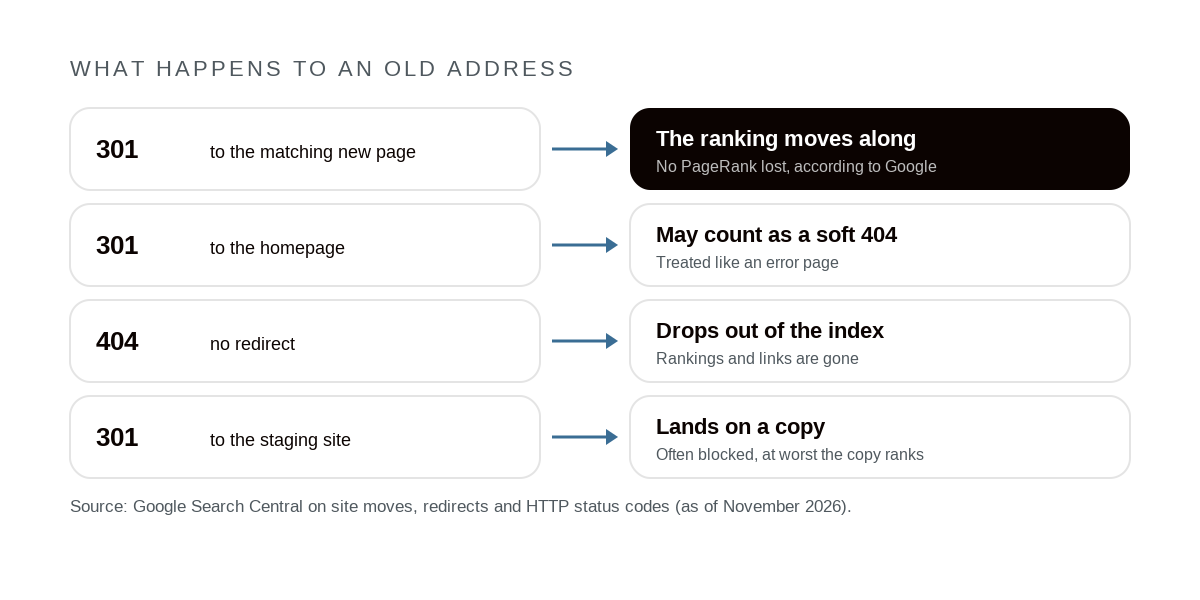
What happens to an old address after a relaunch
After go-live, every address of the old website returns one of a few possible responses. How Google handles each is described in the Google Search Central documentation:
| The old address returns | What Google does | Effect on the ranking |
|---|---|---|
| Permanent redirect (301 or 308) to the matching new page | Shows the new address in search results. According to Google, no PageRank is lost. | The ranking moves along after a transition period. |
| Temporary redirect (302 or 307) | Keeps showing the old address in search results. | The new page does not cleanly take over the signals. |
| Redirect to the homepage or an unrelated page | May treat it as a soft 404, in effect an error page. | The old page's ranking is lost. |
| Error page (404 or 410) | Removes already indexed addresses from the index. | The ranking and the value of links to this address are gone. |
| Redirect to the staging site | Finds a copy that is often blocked or not meant for the public. | At best like an error page, at worst the copy ranks. |
So a relaunch does not go well or badly as a whole. It goes well or badly for each individual address. If you only redirect the ten pages in the menu cleanly, you still lose everything attached to the other addresses: subpages, language versions, expert articles, PDFs.
Why a relaunch costs rankings
Google rates not just the website as a whole but, above all, individual addresses. Over the years each page collects signals: links from other websites, clicks, the track record of answering a question well. When the address changes, the new page is at first an unknown page to Google. Only a permanent redirect (301 or 308) tells Google that the old page has moved. According to Google, such redirects do not cost PageRank.
Without a redirect, the old address returns an error page. Google is clear about this: already indexed URLs that return a 4xx error are removed from the index. Links from other websites to the old address lead nowhere. The new page has to earn its position again, against competitors who did not lose their pages in the meantime.
Even a clean move fluctuates for a while. Google writes that for medium-sized websites it can take a few weeks or more for the new addresses to appear gradually, and that rankings fluctuate temporarily during that time. A collapse lasting months, however, is not normal fluctuation but a sign that something is missing.
The six most common relaunch mistakes
- No complete redirect map. The agency redirects the pages in the menu, but not the subpages, language versions, blog posts and PDFs that other websites link to.
- Everything to the homepage. Sending many old addresses to the homepage avoids error pages but gains little. Google explicitly advises against redirecting many old addresses to a single irrelevant destination such as the homepage, and may treat this as a "soft 404", in effect an error page.
- Redirects to the staging site. During the build, redirects are created to the staging address and nobody fixes them after go-live. Visitors and Google end up on a copy that is often not meant for the public at all.
- Content gets lost. During the rebuild, texts are shortened, merged or dropped: testimonials, pricing pages, FAQs, expert articles. These are often exactly the pages that rank for the searches that bring enquiries. A redirect to a page without that content does not save the ranking.
- Language versions disappear. A language is to be rebuilt "later", or the translations are not carried over. For Swiss companies with customers in French- or Italian-speaking Switzerland, a whole market disappears.
- The staging block stays. The staging site is rightly blocked for Google, with
noindexor a block inrobots.txt. If that setting is copied over at go-live, the entire new website disappears from Google.
Checklist: before, during and after go-live
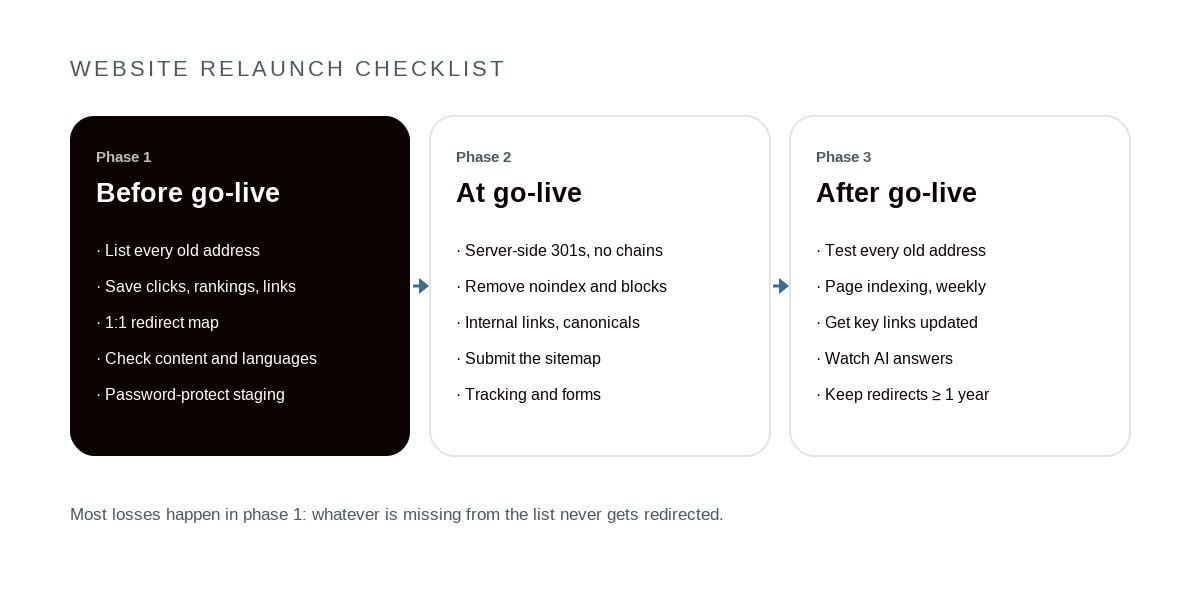
Before go-live
- Keep addresses where you can. The best redirect is none at all. If the new CMS can reproduce the existing paths, keep them. Only change addresses where there is a real reason, such as a new structure or unreadable old paths.
- List every old address. Not just the sitemap. Add the pages from Google Search Console (Performance, Pages), Google Analytics, a backlink tool and the web archive. Many important addresses are no longer in any sitemap.
- Save the data. Record which pages have the most clicks, rankings and links. This is your baseline and the list of pages that must not get lost.
- Build the redirect map. One row per old address, with the matching new destination. Merging is fine when the content really belongs together. For addresses without a matching destination, decide deliberately: carry the content over or let the page go on purpose.
- Compare the content. For the most important pages, check that text, questions, prices and evidence are still there on the new page. What works on Google is not cut without a reason.
- Plan the languages. Every language version gets its own redirects and
hreflangannotations. If you drop a language for now, know what you are giving up. - Protect the staging site. Password protection rather than just
noindex, so no copy of the website ends up on Google.
At go-live
- Server-side 301 redirects. Permanent redirects (301 or 308), straight to the final destination, without chains through several hops. Google recommends server-side redirects wherever technically possible.
- Remove blocks.
noindex, password protection androbots.txtblocks from staging must not reach the live website. - Internal links, canonicals and sitemap. Internal links point to the new addresses, each new page has a self-referencing
rel="canonical", and the new sitemap is submitted in Search Console. - Tracking. Google Analytics, Tag Manager and form goals work on the new website, otherwise the numbers are missing exactly in the critical phase.
After go-live
- Test every old address. Have the whole list of old addresses requested automatically and check where each one leads. It takes minutes and catches most mistakes.
- Watch Search Console. The "Page indexing" report shows addresses with 404, soft 404 and redirect errors. Check it every week in the first weeks.
- Links from other websites. Ask important partners, directories and media to update their links to the new addresses. The redirect helps, a direct link is better.
- At least a year. Google recommends keeping redirects for as long as possible, generally at least a year. From the visitors' point of view, ideally indefinitely.
Rankings already gone: what still helps
If the relaunch was months ago, it is not too late. But time works against you. SEO consultant Glenn Gabe, who has worked on many botched relaunches, puts it this way: a redirect error fixed early costs little. If you wait weeks or months, expect the affected pages to come back only slowly. Google keeps checking old addresses even when they return an error and takes corrected pages back in. The longer a page is missing, the more signals are lost and the more firmly other providers hold the spots.
Here is how to proceed:
- Reconstruct every old address. Without access to the old website, the web archive (archive.org), Search Console (pages with 404 under "Page indexing"), a backlink tool and old Google Analytics exports help.
- Classify each address. If a new page with the same content exists, redirect there. If the content is missing, restore it. If there is no sensible replacement, the address may stay a 404.
- Pages with value first. Start with the addresses that used to have clicks and rankings or links from other websites. Search Console and a backlink tool show them.
- Replace redirects to staging and to the homepage. Each one with the matching destination.
- Tell Google. Submit the new sitemap and request indexing of the most important addresses with URL Inspection in Search Console.
Redirect, or restore at the old address?
| Situation | Better | Why |
|---|---|---|
| A new page with the same content exists | 301 redirect to that page | Google transfers the signals to the new address, no duplicate content is created. |
| Content was lost in the relaunch | Restore the content at the exact old address | Links and search history point exactly to this address, no redirect is needed. |
| A language version is missing | Rebuild the language version, ideally under the old paths | A redirect to another language does not bring back the rankings in this language. |
| No matching content left | Let the 404 or 410 stand | A redirect to an unrelated page achieves nothing and may count as a soft 404. |
Either way: the page must deliver what the old one promised. A thin new page at the old address is treated by Google like a new page.
What a relaunch means for AI visibility
A relaunch does not only affect Google. AI assistants base their answers on the same pages. Google states that a page must be indexed and eligible to be shown with a snippet to appear as a source in AI Overviews and AI Mode. ChatGPT, Perplexity and other assistants also search indexes and crawl the web with their own crawlers. If a page drops out of the index, it also drops out as a source.
The very pages that often get lost in a relaunch are valuable for AI answers: pricing pages, FAQs, testimonials, expert articles and pages in other languages. They answer concrete questions, and that is exactly what assistants pick up. A relaunch is therefore also an opportunity: structure content more clearly, show facts as text rather than in images, add structured data, and you can appear in AI answers more often after the move than before. How to measure this is covered in our article on measuring AI visibility.
How Hierarchy helps
Hierarchy is a full-funnel agency in Zurich specialising in SEO, GEO and paid ads. For a planned relaunch we list every old address, build the redirect map, compare the content and check every old address after go-live. If the rankings are already gone, we reconstruct the old addresses from the web archive, Search Console and backlinks, implement the redirects and restorations or hand them to your web agency as a finished list, and measure every month what comes back. More about our work in search engine optimisation and generative engine optimisation.
Conclusion
A relaunch does not have to cost rankings. Most losses come from an incomplete list of old addresses, redirects to the homepage or the staging site, and content lost in the rebuild. Before go-live, list every old address, redirect each to the matching content, check each one after go-live and keep the redirects for at least a year. If the damage is already done, act now: redirect what has a successor, restore what was lost. Whether your website is named in AI answers today is shown by the free AI visibility check.
Sources
- Google Search Central: Site moves with URL changes
- Google Search Central: Redirects and Google Search
- Google Search Central: How HTTP status codes and network errors affect Google Search
- Google Search Central: AI features and your website
- Glenn Gabe: Can you recover lost search rankings after a botched website redesign or CMS migration?
- Glenn Gabe: 301 redirects to less relevant pages are seen as soft 404s (case study)

About the author