Contents
An AI workshop is half programme and half the questions that come from the room. The questions repeat with remarkable reliability, whether an agency, an accounting firm or an engineering team is sitting at the table. This article collects the thirteen most common ones and answers them the way we do in the workshop: briefly, concretely, and with what to do next.
How a workshop must be built so that it has an effect is covered in AI workshops at work. This piece is about what happens between the programme items. The questions arrive in a typical order: trust in the morning, data around midday, tools and work in the afternoon, and one's own role at the end of the day.
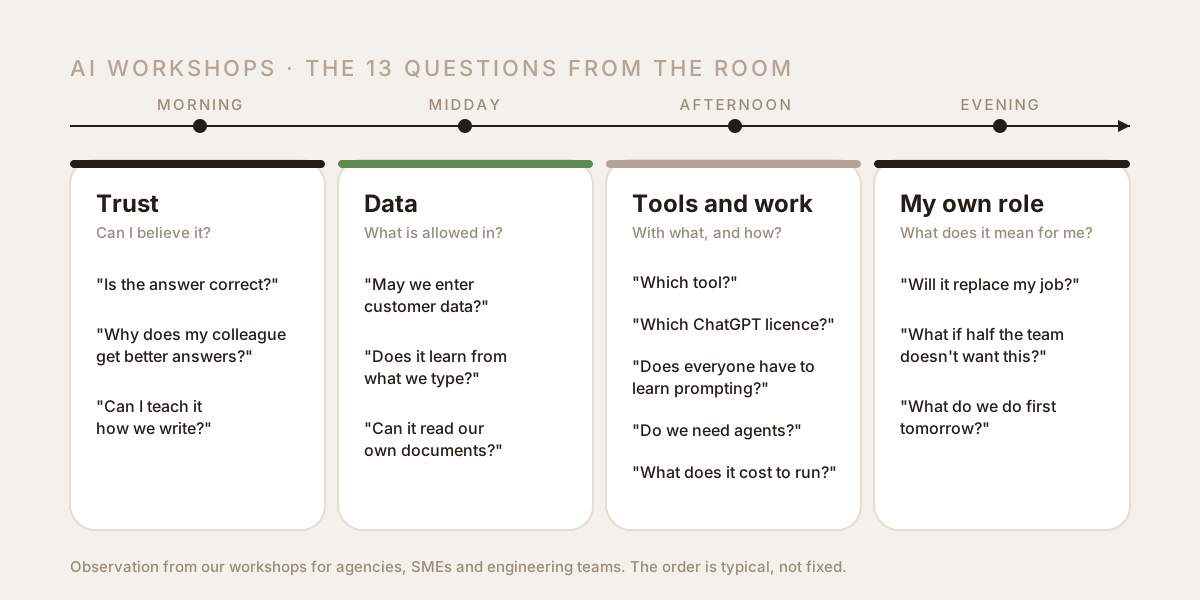
Trust: can you believe AI answers?
1. How do I know whether an AI answer is correct?
The first question of the day, usually right after the first convincing answer. The honest reply: you don't, until you check. Language models produce text that is plausible, and they state wrong claims with the same confidence as right ones. The hit rate is high for general knowledge and noticeably lower for numbers, dates, names, quotes, legal clauses and anything that happened after 2024.
What we put on the wall: anything containing a number, a date, a name, a quote or a legal statement is checked against the source before it leaves the building. For the rest, the division of labour that carries the whole day applies: the AI writes the draft, a person carries the responsibility. Once that is a rule, the question does not need to be asked again for every task.
2. Why does my colleague get better answers from ChatGPT than I do?
This comes up in almost every workshop as soon as two people solve the same task side by side. The answer is nearly always the same: more context. "Write a quote" gets you a generic quote. Saying who it is for, what the client said in the first call, which three points mattered to them, what the last good quote looked like and what exactly must not be in it gets you something you can send after five minutes of correction.
The rule of thumb that sticks: give the AI the same information you would give a new employee on their first day. A prompt is a briefing, not a search query. It also explains why results in the workshop jump as soon as participants bring their own documents.
3. Can I teach ChatGPT how we write?
What is usually meant: can I tell it how we write here, and will it remember? Partly. Most tools have projects, instructions or a memory for exactly this, holding style rules, a glossary and examples. Whatever sits there applies to every answer without being repeated each time. Nobody needs to retrain a model for that, and for an SME it would not pay off anyway.
In the workshop we build exactly that: one page of style rules, five examples and a list of words that must never appear. That is the part that protects a team's voice. Why this is the decisive question for agencies is covered in the programme for agencies.
Data: what may go into ChatGPT and other AI tools?
4. Can I enter customer data into ChatGPT?
This one usually comes from the managing director, around midday, and it is justified. The answer depends on the contract and the settings, not on the tool. In Business and Enterprise plans and via the API, inputs are contractually excluded from training; in free personal accounts they may be used, depending on the settings. Personal data belongs only in tools with a data processing agreement, and even there only as much as the task needs.
What comes out of the workshop is a rule with three categories that every employee can apply: public (may go anywhere), internal (only into accounts approved by the company), personal (only with a contract, and anonymised where possible). What the revised Swiss Data Protection Act and the EU AI Act require is covered in AI and data protection in Switzerland.
5. Does ChatGPT learn from my inputs?
The worry behind it: will our quote show up at a competitor next week? For Business plans and the API: no, the providers contractually guarantee that inputs do not flow into training. For free accounts it can be different and can be switched off in the settings. And regardless of training: a model does not store a document it has seen once in a form another user could retrieve.
In the room we solve it practically: anyone on a personal account checks the training setting on the spot. Anyone buying for a team takes the plan with a contract. That takes ten minutes and ends the discussion for everyone.
6. Can ChatGPT read our own documents?
Yes, and for SMEs this is the most valuable use case. The question often comes from the person who answers the same questions about contracts, products or internal procedures every day. An assistant that answers from your own documents and names the passage the answer comes from replaces searching the file server, not the person who decides. The prerequisite is unspectacular: the documents must be current, findable and in a form that can be read.
How such an assistant is built and what it costs to run is a fixed block in the programme for SMEs.
Tools: which AI tool, which licence, how much effort?
7. ChatGPT, Claude or Gemini: which AI tool for SMEs?
The most frequently asked and least important question. The big models have become interchangeable for most office tasks; the differences lie in details such as document length, integration with Microsoft or Google, and data contracts. More important than the tool is that the whole team uses the same one, with the same prompts, in the same account, under the same data rule.
Our recommendation in the room: one tool for text and analysis, one for images if needed, and no collection of twelve subscriptions. Where ChatGPT and Claude differ for which task is covered in ChatGPT vs. Claude for SMEs.
8. ChatGPT Free, Plus, Business or Enterprise: what is the difference?
This comes up as soon as someone notices that half the company works on a personal Plus subscription. There are two families, and the difference is not in the models but in the contract. The personal plans Free, Go, Plus and Pro differ in models, limits and speed; they belong to the person, not the company, inputs there may be used for training by default, and nobody in the company can manage who uploads what where. The business plans Business and Enterprise exclude training contractually and bring a data processing agreement, an admin console, a shared workspace for projects and prompts, and, with Enterprise, SSO and compliance features. The API is the third option: billed by usage, no training, meant for workflows that run in the background rather than for chat.
The rule we put on the wall: as soon as customer data is involved, Business is the minimum. Plus is enough for individuals who work only with public data, Pro pays off for a few power users, Enterprise from teams with SSO and compliance needs. The step up from Plus to Business per person is small compared with a single data protection mistake, and it answers questions 4 and 5 at the same time.
9. Do you have to learn prompting?
No. This is the answer that brings the most relief. In most teams, five to ten good prompts are enough, written carefully once and reused by everyone: the quote, the meeting summary, the customer reply, the product text. Anyone who does a task ten times a week needs a workflow for it, not craftsmanship.
That is why the workshop does not end with prompting theory but with a prompt library that sits on the team drive and that anyone can copy. The two or three people who maintain that library are the ones who need to learn prompting.
10. What is an AI agent, and does an SME need one?
An agent is a model that does not just answer but carries out steps: reading emails, querying a CRM, filing a draft, asking back. The question comes up almost always because someone read the term in the news. The honest answer for most SMEs: not first. An agent pays off for a process that happens often, has clear rules, and where an error is noticed before it does damage.
In the workshop we identify exactly one such process, if there is one, and build the rest as simple workflows. What agents can actually do in 2026 and where people remain is covered in AI agents at work.
11. What does AI cost to run for an SME?
Less than most people think, and distributed differently. Licences for a team of ten cost less than half a working day per month. More expensive are the hours that go into setting up and maintaining workflows, and those arise only once. The calculation that ends up on the flip chart in the workshop: how often does the task occur, how long does it take today, how long with the workflow, how often does it need rework.
Concrete calculations for typical SME tasks are in How much time does AI really save?. Anyone who does the calculation before the workshop can check after 30 days whether it holds.
Your own role: what does AI mean for employees?
12. Will AI replace my job?
Rarely asked out loud, always in the room. The answer we give and stand behind: AI replaces tasks, not roles, and first the ones nobody misses: summaries, first drafts, copying data from one system into another, standard replies. What remains becomes more important: the responsibility for the result, the customer contact, the decision about what gets done at all. In practice the work shifts from writing to checking.
What is also honest: anyone who today does only tasks from the first list should pay particular attention in the workshop. That is not a reason against the workshop. It is the reason for it.
13. What to do when the team does not want AI?
That is normal, and it is not a problem as long as it is not solved with persuasion. Scepticism in AI workshops is usually experience: someone tried it, got a wrong answer and drew the correct conclusion that you must not trust it blindly. The answer to that is not more enthusiasm but a task where checking is easy and the time saved is felt immediately.
That is why implementation after the workshop does not start with everyone but with the two or three people who want it, on the one task that worked best in the workshop. After 30 days the numbers show whether it pays, and numbers convince sceptics better than talks.
How to introduce AI after the workshop: one task first
One task, not ten. Pick the recurring task that worked best in the workshop. Decide who does it with the new workflow from Monday and who checks the result. Note today how long it takes and how often it needs rework, and measure the same after 30 days. Only when that runs does the second task follow.
Conclusion
The questions from the room are not a disruption of the programme. They are the programme. Anyone who knows them in advance can build a workshop in which the answers are not presented but experienced on the team's own tasks. That is exactly how our AI workshops for agencies, SMEs and engineering teams are built: with real tasks, a data rule, a prompt library and a review after 30 days. If your team has different questions from these thirteen, that is the best reason for a first conversation.

About the author