Contents
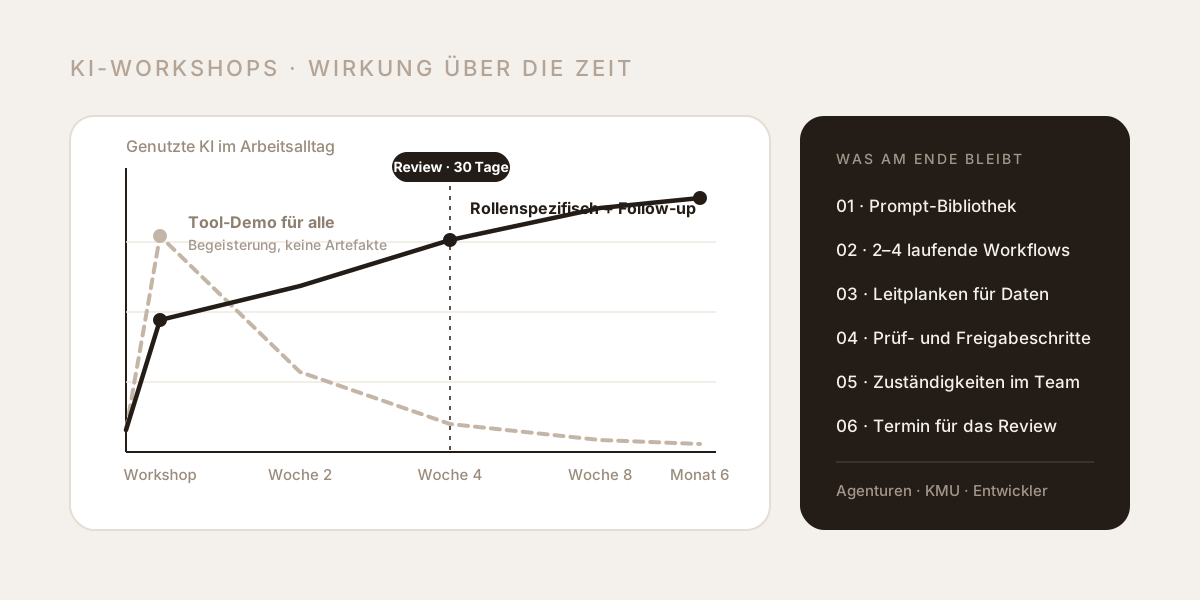
The most common mistake in AI training isn't the choice of tools, it's the assumption that everyone in the room needs to learn the same thing. Half a day of tool demos for the whole workforce reliably produces enthusiasm — and reliably produces no change. If you want a team to genuinely work differently afterwards, you need three things: role-specific content, real tasks instead of demo data, and artefacts that outlive the workshop day.
We train teams in agencies, SMEs and software engineering, and the patterns repeat with remarkable consistency. This piece describes why the usual formats fail, what a programme per role looks like, what has to be on the table at the end — and how to measure the effect instead of guessing at it.
Why most AI workshops change nothing
Four mistakes explain almost every ineffective session. They rarely appear alone.
| Mistake | What happens in the workshop | What happens afterwards |
|---|---|---|
| Tool tour instead of task | The trainer shows what the tool can do, using the trainer's examples | Participants can operate the tool but can't solve their own work with it |
| One session for every role | Content is generalised until it is concrete for nobody | Every role waits for "their" part, which never comes |
| No artefacts | Lots of experimenting, nothing saved | On Monday everyone starts from zero again |
| No follow-up | The day ends with "get in touch if you have questions" | The first real questions appear in week two — and go unanswered |
There is a fifth pattern that gets named less often: the unanswered data question. If nobody says definitively which customer data, contracts or HR files may go into which tool, every individual decides for themselves — the cautious ones don't use AI at all, the bold ones upload whatever is open. Both are expensive; the second is also risky.
AI workshops by role: agencies, SMEs and developers
Language models are general-purpose tools. The work isn't. An order-processing clerk, a creative director and a backend engineer need the same foundation — how models work, where they invent, which data may go in — and after that completely different applied skills. That's why we work with three programmes.
AI for agencies: volume without losing your signature
In creative and performance teams somebody is almost always using GenAI already, but without shared standards. The result is copy that sounds generic and gets rewritten from scratch in editing, and creatives that are technically clean and still interchangeable. The leverage isn't in better prompts, it's in a system.
| Module | What actually gets produced |
|---|---|
| Content production with GenAI | A brand-voice prompt per client, built from real reference texts instead of adjective lists |
| Ad creation & performance creatives | Systematic derivation of angles, hooks and test variants from an offer |
| Creatives, image & motion | Consistent series across formats, plus clarity on image rights and disclosure |
| Creative systems | Prompt library, brand kit with no-gos, pipeline from brief to asset |
| Quality control & approvals | Review gates before client approval, fact-checking routine, handling hallucinations |
The most common worry in this programme is the loss of signature — and it is justified as long as tone of voice exists only in the senior copywriter's head. Once it exists as a system the effect inverts: the first draft already sounds like the brand and gets sharpened rather than rescued. Details in the programme for agencies.
AI for SMEs: the hours that disappear into small work
In SMEs the potential rarely sits in a big project. It sits in the fifty small steps per day: copying quotes together from old documents, forwarding enquiries by hand, retyping receipts, answering the same question for the twentieth time, pulling numbers for a meeting out of four systems. Each case looks too small to solve; together they add up to days per month.
| Module | What actually gets produced |
|---|---|
| Process automation | Two to four working automations, with an approval step in the right places |
| Lead generation & outbound | Ideal customer profile, enrichment, prioritised list, personalised first contact |
| AI assistant on your own knowledge | An assistant on price lists, manuals and minutes — answering with sources |
| Customer service | Automatic triage, reply drafts, a clear rule for escalating to a human |
| Analytics & reporting | Monthly reporting that comes together without manual work and prepares a decision |
The sequencing mistake is especially expensive here: many teams start with the most visible use case rather than the most worthwhile one. A sober inventory — frequency times duration times error rate — almost always reorders the priority list. Details in the programme for SMEs and in our piece on how much time AI really saves.
AI for developers: the bill arrives at review
Engineering teams don't need a programme that explains AI to them — they have been working with it for a long time, just at very different levels. The typical patterns: prompts written for older models that now cause over-verification and bloated diffs; sessions with a context so full that quality tips over; and generated code that looks plausible, misses edge cases and eats the time at review that was saved up front.
| Module | What actually gets produced |
|---|---|
| Coding efficiently and cost-consciously | Model and effort choice per task type, context discipline, cost per task |
| Verification loops & tests | Checks the model runs itself: test suite, build, linter, comparison script |
| Designing complex systems | Specifications that are implementable; a planning step before implementation |
| Deployment & infrastructure | IaC and pipelines with AI, incident triage — with hard guardrails for secrets and permissions |
| Agents & security | Recurring work captured as automation, plus prompt-injection and licensing questions |
That AI doesn't automatically make experienced developers faster isn't an opinion: in a randomised study by METR on large open-source repositories the participants knew well, experienced developers took about 19 % longer with AI assistance — while estimating they had been roughly 20 % faster. That gap between feeling and measurement is exactly why this programme looks at review time, error rate and cost per task instead of impressions. Groundwork in Prompting Claude Code properly, details in the programme for developers.
How to structure an AI workshop that works
The structure is unspectacular, but the order and the time split decide the outcome. As a rule of thumb: around 70 % of the time is practice on your own screen.
| Phase | Share | Content |
|---|---|---|
| Preparation (before the day) | – | Short interviews, task inventory, prior-knowledge survey, collecting cases |
| Fundamentals | ca. 15 % | How models work, where they invent, how a good prompt is built, guardrails |
| Application on real tasks | ca. 55 % | Work on the cases people brought, in small groups, with support |
| Systematising | ca. 20 % | Saving results as templates, setting up the prompt library, defining review steps |
| Agreeing | ca. 10 % | Who owns what, what gets tested by when, when the review happens |
| Follow-up (after 30 days) | – | Compare the metrics, sharpen the prompts, pick the next candidates |
Two details matter disproportionately. First: the cases come from the participants, not the trainer. A task somebody already finds tedious is the best entry point — especially with sceptics. Second: whatever is created in the workshop gets saved immediately. A good prompt that doesn't land in a shared library is lost by Friday.
What an AI workshop has to deliver as a result
A workshop without artefacts is an event. This list is our minimum:
- A prompt library in one place everyone can reach, with a short note on what each prompt is for.
- Two to four working workflows or automations — in production, not as a sketch.
- Guardrails on one page: which data goes into which tool, who checks, who approves, what doesn't belong in external tools at all.
- Review and approval steps for the tasks where a mistake would be visible to the outside.
- Ownership: one or two people per team who act as the point of contact and onboard new colleagues.
- A date for the 30-day review, in the calendar, with names on it.
AI training as an obligation: AI literacy under Article 4 of the EU AI Act
Alongside the business case there is a regulatory reason for structured training. Article 4 of the EU AI Act requires providers and deployers of AI systems to take measures on their staff's AI literacy, applicable since 2 February 2025. The original text asked for a "sufficient level" of literacy. Since the Digital Omnibus (Regulation 2026/1744, in force since 27 July 2026), companies must support the development of AI literacy but need not guarantee a particular level for anyone. The obligation is softer now, but it has not gone away. The regulation's scope doesn't stop at the EU border: it can cover Swiss companies that place AI systems on the EU market or whose output is used there.
The regulation prescribes no particular form of training, no certificate and no number of hours. The measures should fit the prior knowledge, the role and the context in which the system is used. In practice: document who took part, what was covered and when; keep the content role-specific; and repeat it for new systems and new staff. What else the Digital Omnibus moved, such as the high-risk obligations to December 2027, is covered in the guide. More in our pieces on the EU AI Act for SMEs and on AI and data protection in Switzerland. How municipalities and public administrations build their staff's AI literacy is shown in AI training for Swiss municipalities.
Measuring the success of AI training
Feedback forms on the workshop day measure mood, not effect. Record a small number of metrics beforehand and again after 30 days:
| Metric | How to record it | Why it matters |
|---|---|---|
| Duration per task | For three to five concrete tasks, estimated or timed before and after | The most direct translation into time and money |
| Frequency per week | From the system or with a tally sheet | Automating a rare task rarely pays off |
| Rework rate | Share of output that has to be revised | Shows whether quality holds or work was merely displaced |
| Active workflows | How many of the workflows built are still running after 30 days | The most honest adoption indicator |
| Users per workflow | Number of people actually using it | Separates "one person tinkers" from "the team works this way" |
| Cost per task | For engineering teams: token cost per ticket | Turns model and effort choice into a deliberate decision |
Even the pre-workshop measurement has an effect on its own: it forces prioritisation and stops the most visible use case from crowding out the most worthwhile one.
Common mistakes when planning AI workshops
| Mistake | Better version |
|---|---|
| All departments in one generalist session | Fundamentals together, application split by role |
| A workshop on the trainer's demo data | Cases from your own business, collected beforehand |
| Inviting only the enthusiasts | Deliberately include sceptics — with a task that annoys them personally |
| Settling the data question "later" | Fix the guardrails definitively during the workshop |
| No date after the workshop | A 30-day review fixed in the calendar, with metrics |
| One big day for 40 people | Groups of 4 to 12, and more sessions instead |
| Training once | Repeat for new systems and new staff |
Conclusion
An AI workshop that works differs from one that fizzles out not through better slides or a more modern tool. It differs because participants work on their own tasks, because every role gets what it actually needs, because prompts, workflows and guardrails are on the table at the end of the day, and because somebody checks in 30 days what of it is still running.
The shortest test for any proposal you request: ask what the team is holding in its hands at the end of the day. If the answer is "presentation materials", keep looking.
Wondering which programme fits your team? An overview of the three programmes is at AI workshops & training — or talk to us directly.
Sources
- EU AI Act, Article 4 – AI literacy – obligation for providers and deployers, applicable since 2 February 2025, in the softened Digital Omnibus version since July 2026.
- European Commission – AI literacy: questions and answers – interpretation of the obligation, no prescribed form of training.
- METR – Measuring the Impact of Early-2025 AI on Experienced Open-Source Developer Productivity – randomised study, roughly 19 % longer completion times despite the opposite self-assessment.
- FDPIC – The revised Data Protection Act – obligations when processing personal data in Switzerland.
- Anthropic – Best practices for Claude Code – verification, context management and the planning step in AI-assisted development.

About the author