Contents
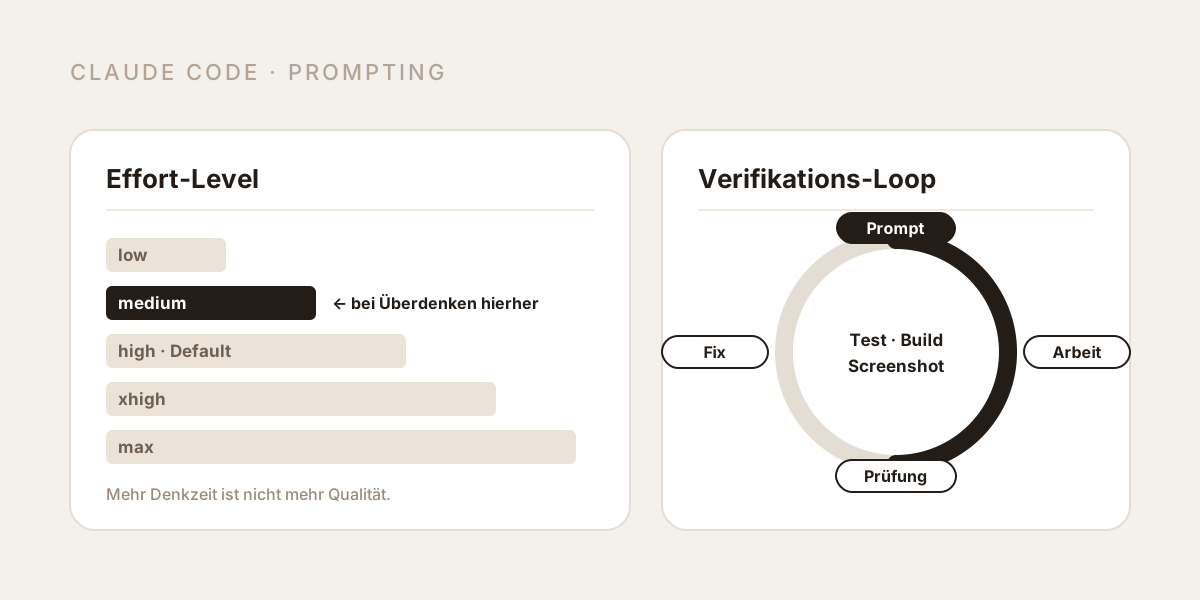
If you want consistently good results in Claude Code, the thing to tune is not the wording of your prompt but three others: the effort level, the context, and a check the model can run itself. When Opus 5 overthinks a long, complex task, the fix is usually counterintuitive - not more thinking, but less: run the same task at medium or low effort.
Since the Opus 5 release the same questions keep coming up: why does the model perform worse than its predecessor? Why is it so slow? Why does it overthink simple things? And why did Claude Code get slower in the first place? Every one of those has a documented answer - and in almost all cases the cause is not the model but prompts, configurations and habits carried over from the era of older models. This article sorts out the causes and describes the setup we use ourselves.
What actually changed with Claude Opus 5?
Opus 5 is not an incremental update, and several changes bear directly on how prompts behave:
| Change | What it means for your work |
|---|---|
| Thinking is on by default | The model decides when and how deeply to think on each turn; effort is the control |
| 1M token context window (default and maximum) | Long sessions are possible - but context discipline still decides quality |
| Five effort levels: low, medium, high, xhigh, max | Effort has become the primary cost and latency control |
| Verifies its own work unprompted | Legacy verification instructions now cause over-verification |
| Longer responses and longer written documents | Brevity has to be requested explicitly |
| Delegates to subagents more readily | Without guardrails this multiplies cost and time |
Thinking can only be disabled up to effort high | At xhigh and max the API returns a 400 |
The key consequence is in Anthropic's own documentation: Opus 5 converts additional effort into better results more reliably than any earlier Opus model - which means the level you pick carries more weight than before, in both directions.
Why does Opus 5 perform worse than the previous model?
Because many prompts are still written for a model that no longer exists. The following five patterns were helpful on Opus 4.x and are actively harmful on Opus 5:
| Pattern in the prompt | Why it hurts on Opus 5 |
|---|---|
| "Double-check your answer", "re-verify before responding" | Opus 5 verifies anyway; the instruction compounds and produces over-verification with no quality gain |
| "Include a final verification step", "use a subagent to verify" | Same effect, plus unnecessary subagent cost |
| "Only report high-severity issues", "be conservative" | Followed literally: the model reports less than it found |
| "Keep responses under X words" in the system prompt | Hard verbosity limits measurably cost quality (see the postmortem below) |
| Effort defaults carried over from the previous model | The levels behave differently on Opus 5; Anthropic explicitly recommends a fresh effort sweep |
There is also a behaviour that quickly reads as "worse quality": scope expansion. Opus 5 adds steps that weren't requested and applies its own judgement about what the task should be. On narrow tasks that isn't a feature, it's a diff nobody wanted to review. The counter-measure is an explicit scope rule in the prompt or in CLAUDE.md:
Deliver what was asked, at the scope intended. Make routine
judgment calls yourself, and check in only when different
readings of the request would lead to materially different
work. If a better approach exists, say so in a sentence and
then do what was asked anyway.
Does Opus 5 overthink - and what helps?
Yes. And the most effective counter-move is to solve the task at a lower level.
The pattern is well documented: on long, complex tasks at high effort levels, the model starts second-guessing obviously correct approaches, initiating extra refactors and making changes outside the assigned scope. Anthropic already notes for the previous models that max can lead to overthinking on structured or less intelligence-sensitive tasks; independent benchmarks report a coding-performance optimum for Opus 5 in the middle of the effort range, with diminishing to negative returns above it.
The practical rule: when Opus 5 overthinks a long, complex task, run the same task at medium or low. That is not a quality compromise - it is frequently a quality improvement, and it saves a substantial share of the tokens and the waiting time along the way.
| Effort level | What it's for | When to pick it |
|---|---|---|
low | Maximum efficiency, significant token savings | Clearly scoped single tasks, subagents, classification, fast iteration |
medium | Balance of speed, cost and quality | The best starting point for routine coding and agentic workflows |
high (default) | High capability | Complex reasoning, hard bugs, unfamiliar codebases |
xhigh | Extended capability for long-horizon work | Agentic tasks over 30 minutes, large refactors, wide tool loops |
max | Maximum with no token constraints | Only when the task justifies unconstrained token spending |
Two details cause recurring confusion:
- Effort is a behavioural signal, not a token budget. Even at
lowthe model still thinks on sufficiently hard problems - just less deeply than athigh. - Effort does not control response length. On Opus 5, lowering effort does not reliably shorten the visible answer. If you want shorter responses, ask for them: "Keep responses focused, brief and concise. Keep disclaimers short and spend most of the response on the main answer."
A third point matters for anyone tempted to disable thinking to save cost: on Opus 5 that is only possible up to effort high, and with thinking disabled two artefacts occasionally appear - tool calls written as text instead of a structured call, and internal XML tags leaking into the visible response. Thinking enabled at low beats thinking disabled at comparable cost.
Why is Opus 5 so slow?
A fair question, but it rarely has a single cause. In order of frequency:
- Effort is set to
highorxhighwheremediumwould do. The biggest and fastest-acting lever. Switch it in Claude Code with/effort. - The context is full. The context window holds every message, every file read and every command output. Performance degrades as it fills - the model starts "forgetting" earlier instructions and making more mistakes. Use
/clearbetween unrelated tasks and/compact <focus>at breakpoints. - Research runs in the main context instead of subagents. A broad codebase investigation reads dozens of files - all of which land in your context. Subagents have their own context window and report back only a summary.
- Too many MCP servers and tools are active. Every tool schema costs context on every turn.
- Unrequested subagent delegation. Opus 5 delegates readily; on small tasks that multiplies cost and time. A rule in CLAUDE.md helps: delegate only for large, genuinely independent tracks of work, and never to double-check its own output.
- Outdated version or a platform incident.
claude --versionandclaude update, then/doctor, then the status page.
Why did Claude Code get slower and worse?
For March to April 2026 there is an official and unusually transparent answer. In a postmortem published on 23 April 2026, Anthropic disclosed three independent product changes that overlapped, each affecting a different slice of traffic:
- 4 March: Claude Code's default reasoning effort was lowered from
hightomedium, in response to very long thinking times that made the UI appear frozen. Anthropic later called this the wrong trade-off and reverted it. - 26 March: A change was meant to clear older thinking once from sessions idle for more than an hour. A bug made it happen on every turn for the rest of the session - Claude seemed forgetful and repetitive. Fixed on 10 April.
- 16 April: A verbosity limit in the system prompt ("keep text between tool calls to 25 words or less", "keep final responses to 100 words or less"). Ablations run during the investigation showed roughly a 3% quality drop. Reverted on 20 April.
Model weights and the API layer were unaffected. For everyday practice there is a lesson in this that outlives the incident: hard length caps in a system prompt cost quality. If Anthropic's own verbosity limit measurably hurt, the same instruction in your CLAUDE.md does too. Control length through style preferences ("focused and concise"), not through hard word ceilings on the work itself.
What does a good prompt in Claude Code look like?
The biggest difference is not the phrasing but the amount of usable context and a verifiable end state:
| Instead of | Better |
|---|---|
| "Add tests for foo.py" | "Write a test for foo.py covering the edge case where the user is logged out. Avoid mocks." |
| "Fix the login bug" | "Users report that login fails after session timeout. Check the auth flow in src/auth/, especially token refresh. Write a failing test that reproduces the issue, then fix it." |
| "Add a calendar widget" | "Look at how existing widgets are implemented on the home page - HotDogWidget.php is a good example. Follow that pattern. No new libraries." |
| "The build is failing" | "The build fails with this error: [error]. Fix it and verify the build succeeds. Address the root cause, don't suppress the error." |
| "Make the dashboard look better" | "[screenshot] Implement this design. Then take a screenshot of the result, compare it to the original, list the differences and fix them." |
For larger work the order is explore → plan → code → commit: read and understand in plan mode first, then have a plan written, then implement. For small, clearly scoped changes plan mode is pure overhead - if you can describe the diff in one sentence, skip it.
Opus 5 is at its strongest when it gets the complete task specification up front and is then left to run. For bigger features a two-stage approach pays off: in a first session let it interview you ("Interview me in detail about technical implementation, UX, edge cases and trade-offs, then write a complete spec to SPEC.md"), then implement the spec in a second, fresh session. The new session has clean context, and you have a written reference document.
Verification loops: the lever with the largest effect
Claude stops when the work looks done. Without a check it can run itself, "looks done" is the only signal available - and you are the verification loop: every mistake waits for you to notice it.
A verification loop is anything that returns a readable pass or fail: a test suite, a build exit code, a linter, a script that diffs output against a fixture, a browser screenshot compared against a design. There are four escalation levels for how hard that check gates the end of a turn:
| Level | Implementation | When it makes sense |
|---|---|---|
| In the prompt | "...run the tests and iterate until they pass" | Works today, on any task |
| As a skill | Capture the recurring check in .claude/skills/ | Project-specific rules no linter knows |
| As a session goal or hook | A Stop hook blocks the turn from ending until the script passes | Unattended runs |
| As a second opinion | A review subagent in fresh context, looking only at the diff | Before merging, after long autonomous runs |
The skill route compounds the most: you write the procedure down once in plain language - the way you'd hand it to a new teammate on day one - and save it as a SKILL.md. In Building verification loops in Claude Code with Skills Anthropic describes four deployment models: standalone (invoked manually, e.g. for security audits), embedded (runs automatically inside a producing skill's workflow), chained (one skill triggers the next) and PR-integrated (runs in GitHub Actions on every pull request). The practical entry point: for one week, note down which correction you keep giving Claude by hand - that is exactly what belongs in a skill.
What matters throughout is evidence: have it show the test output, the command it ran, or the screenshot, instead of trusting a "done". Reviewing evidence is faster than re-running the verification yourself - and it works for sessions you weren't watching.
Context is the scarcest resource
Nearly every Claude Code best practice follows from a single observation: the context window fills up fast, and performance degrades as it fills. One debugging session can generate tens of thousands of tokens. Four habits make the difference:
/clearbetween unrelated tasks. The "kitchen sink session", where you jump between three topics, is the most common self-inflicted wound.- Stop after two failed corrections. If you've corrected the same issue twice and it's still wrong, the context is polluted with failed approaches.
/clearplus a better initial prompt that incorporates what you learned almost always beats a long session with accumulated corrections. - Move research into subagents. "Use subagents to investigate how our auth system handles token refresh" keeps the main context free for implementation.
- Scope investigations narrowly. A vague "have a look at this" leads to hundreds of files being read.
What belongs in CLAUDE.md - and what doesn't
CLAUDE.md is loaded at the start of every session, so every line costs context permanently, and a bloated file causes real rules to get lost. The test for each line: would removing this cause Claude to make mistakes? If not, cut it.
| Include | Exclude |
|---|---|
| Bash commands Claude can't guess | Anything discoverable by reading the code |
| Code style rules that differ from defaults | Language conventions the model already knows |
| Test runners and testing instructions | Detailed API documentation (link to it instead) |
| Repository etiquette (branch naming, PR conventions) | Information that changes frequently |
| Architectural decisions specific to this project | File-by-file descriptions of the codebase |
| Environment quirks and non-obvious gotchas | Self-evident advice like "write clean code" |
| Scope and delegation guardrails for Opus 5 | Verification instructions ("double-check your work") |
If Claude keeps doing something wrong despite a rule against it, the file is usually too long and the rule is drowning in noise. Knowledge that is only needed sometimes doesn't belong in CLAUDE.md but in skills - Claude loads those on demand without weighing down every session.
A prompt template to copy
For a typical implementation task this structure covers the four things that matter: location, pattern, scope and check.
Goal: [what should work at the end, in one sentence]

Context:
- Relevant files: @src/... , @tests/...
- Follow the existing pattern in [file]
- Out of scope: [what must not be touched]

Approach:
- Read and understand first, then implement
- No new dependencies

Verification:
- Write a failing test that reproduces the problem first
- Run [command] and iterate until it passes
- Show me the test output, not just a success message
What is deliberately missing from this template: "double-check your work", "be thorough", "think carefully", "you are a senior engineer". Role prompts and double-check instructions add nothing on current models - and the verification instructions actively hurt on Opus 5.
Troubleshooting: symptom, cause, fix
| Symptom | Likely cause | Fix |
|---|---|---|
| Overthinks simple tasks, refactors unprompted | Effort too high for the task | /effort medium or low; add a scope rule to the prompt |
| Extremely long answers | Opus 5's verbosity default | Ask for brevity explicitly (effort won't do it) |
| Seems forgetful, repeats itself | Context full or session too long | /clear, /compact <focus>, move research to subagents |
| Reports too little in review | "Be conservative" phrasing in the prompt | Have it report everything, filter in a second pass |
| Burns tokens without progress | Over-verification from legacy instructions | Delete verification and double-check sentences |
| Spawns too many subagents | Opus 5's delegation default | Delegation guardrail in CLAUDE.md, cap spawn counts |
| Plausible code that misses edge cases | No verification loop | Test cases in the prompt, the check as a skill or hook |
| Generally slow, tool calls hang | Version, MCP load or platform | claude update, /doctor, trim MCP servers, check status page |
Conclusion
The three most common complaints about Opus 5 - too slow, overthinks, worse than before - share one root: the model works more thoroughly and more independently than its predecessors, and legacy prompts amplify exactly what it already does. Delete the verification and double-check sentences, constrain scope explicitly, treat the effort level as a primary control instead of leaving it at the default, and give the model a check it can run itself - and the same model produces markedly better and faster results.
The shortest rule of thumb for daily work: if it overthinks, drop to medium. If it doesn't know enough, move up to the larger model. And always give it something that tells it when it's actually done.
Want AI-assisted development and automation to be a reliable process in your company rather than an experiment? That is exactly where our AI workshops for developers come in. Let's talk.
Sources
- Anthropic - Prompting Claude Opus 5 - verbosity, scope, over-verification, subagent delegation, thinking disabled.
- Anthropic - What's new in Claude Opus 5 - thinking on by default, 1M token context, effort restriction, pricing.
- Anthropic - Effort - the five levels, Opus 5 recommendations, effort with tool use and prompt caching.
- Anthropic - Best practices for Claude Code - verification, plan mode, context management, CLAUDE.md, failure patterns.
- Anthropic - Building verification loops in Claude Code with Skills - the four deployment models for verification skills.
- Anthropic - An update on recent Claude Code quality reports (23 April 2026) - effort default, caching bug, verbosity limit with ~3% quality drop.
- Anthropic - Choosing a Claude model and effort level in Claude Code - model versus effort, the diagnostic question.
- Anthropic - Prompt engineering best practices for 2026 - what is less necessary today (XML tags, role prompts) and what still holds.
- SitePoint - Claude Opus 5 is most efficient at medium effort (FrontierCode) - independent benchmark showing a performance optimum at medium effort.
- InfoQ - Anthropic traces six weeks of Claude Code quality complaints to three product changes - context on the postmortem.

About the author