Contents
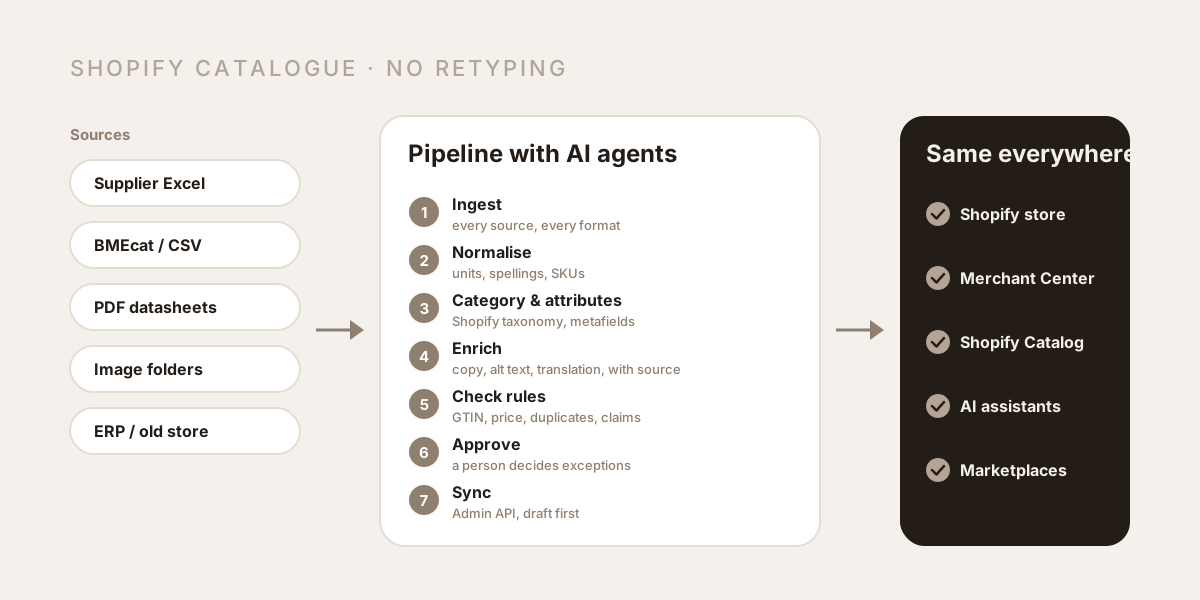
In many online stores, product maintenance still looks like this: someone opens the supplier's spreadsheet, copies the item number, price and EAN into the store, hunts down the data sheet as a PDF, types out dimensions and materials, crops images, writes some copy, sets up sizes and colours as variants, and then repeats it all for the next product. With twenty new items a month, that works. With a new collection of 400 items or a change of model year, it becomes a bottleneck. This post shows how the catalogue of a modern Shopify store is built in 2026, with which tools, using three concrete examples, and which guardrails stop AI from introducing errors along the way.
Why manual work now costs twice as much
Creating products by hand has always been slow. What's new is that data quality decides visibility.
More channels read the same data. Today a product doesn't just appear in your own store but in Google Merchant Center, in Google Shopping and Google AI Mode, in the Shopify Catalog, which ChatGPT, Copilot and other AI assistants pull products from, and on marketplaces. Each of these channels needs structured fields, not just nice copy.
Gaps are punished invisibly. A product without a category from the Shopify taxonomy counts as "Uncategorized" and is excluded from the Shopify Catalog. A product without material and dimensions can't answer an AI assistant's question "waterproof, 15 inch, under 200 francs". Nobody gets an error message; the product simply doesn't get recommended. We describe exactly what AI agents need in Agentic commerce: what Swiss online stores need to know now.
Manual work is inconsistent. Three people write "Polyester", "PES" and "100 % polyester". For a filter in the store and for an agent, those are three different values.
So the question is no longer whether you can create products faster, but how you build a catalogue that is complete, consistent and the same everywhere.
What makes a modern Shopify product: category, metafields, variants
In 2026, a product in Shopify is a lot more than a title, copy, an image and a price:
- A category from the Standard Product Taxonomy. Shopify assigns every product to exactly one category, such as Apparel & Accessories › Clothing › Clothing Tops › Shirts. Shopify uses it for filters, for channels such as Google and Facebook, for Shopify Tax and for reports.
- Category metafields. Every category brings its own attributes, for shirts for example neckline, sleeve length and colour. They can be linked to variants and feed the filters in the store.
- Custom metafields and metaobjects. For everything the taxonomy doesn't cover: size charts, care instructions, origin, certificates, data sheets.
- Variants. Up to 2048 variants per product, each with its own SKU, its own stock, its own GTIN and its own images.
- SEO fields. Page title, meta description, alt text, a descriptive URL.
- Translations for every language you sell in, in Switzerland often German, French, Italian and English.
If you maintain all of that by hand, you either need a lot of time or you leave fields empty. Usually it's the latter.
The pipeline: how a catalogue is built without retyping
A modern catalogue pipeline for Shopify has seven steps. The tools can vary; the logic stays the same.
- Ingest. Supplier lists as CSV or Excel, in German-speaking markets often BMEcat, plus PDF data sheets, image folders and, for existing stores, the export from the old system.
- Normalise. Every source is brought into a common schema: SKU, GTIN, brand, manufacturer part number and attributes with consistent units. "PES", "Polyester" and "100 % polyester" become one value.
- Assign category and attributes. Every product gets its category from the Shopify taxonomy, and the category determines which attributes need to be filled.
- Enrich with AI agents, source-bound. Agents pull values from data sheets, write titles and descriptions, generate alt text and translate. Every technical value is stored with its source.
- Rules and checks. Required fields present, GTIN check digit valid, price and margin plausible, no duplicates, no prohibited claims.
- Approval. A person reviews whatever the rules flag: new suppliers, regulated categories, large price changes, any claim that doesn't come from a source.
- Sync and publish. Products go into the store through the Shopify Admin API, first as drafts, then published. From there they flow into Google Merchant Center, the Shopify Catalog and marketplaces.
Three examples from Swiss retail
The following examples are typical starting points, not client projects with figures. They show what the pipeline looks like depending on the range.
Bike shop: a new model year from the supplier list
The supplier sends a spreadsheet with item number, EAN, model year, frame size, colour, retail price, purchase price in Swiss francs and a link to the PDF with the geometry.
- The pipeline groups the rows by model and colour into one product, and frame sizes become variants.
- Category attributes such as frame material, brake type, motor and battery capacity are only filled if they appear in the data sheet.
- Prices come from the retailer's margin rules, not copied from the list.
- A person approves the new model year. Old model years are archived or redirected, not deleted, so their URLs don't lead nowhere.
What used to be days in front of a screen is now a review list containing the cases that actually need a judgement call.
Fashion label: variants and images without chaos
A label exports rows per style, colour and size from its ERP, plus an image folder with file names by SKU.
- The pipeline creates one product per style; colour and size become options, and every combination is a variant with its own stock.
- Images are matched to the right colour by file name, and alt text is built from the verified attributes: "Linen shirt in sage green, back view".
- Size charts exist once as a metaobject and are assigned to all matching products.
- Material, fit and care come from the ERP, not from the text model's imagination. For apparel, Google requires colour, size, gender and age group, among other things.
Wine merchant: vintages and special rules
Producers send price lists with vintage, grape variety, region, bottle size, alcohol content and notes on sulphites.
- Every vintage becomes its own product, because ratings, price and availability differ.
- Tasting notes come from the producer; the agent may rephrase them but must not invent anything.
- Alcohol is excluded from the Shopify Catalog, and Google restricts alcohol in Merchant Center. Visibility in AI assistants therefore depends more on your own pages, on guides and on mentions in wine guides and reviews.
Importing Shopify products: CSV, API, Sidekick or pipeline?
Shopify offers several ways to create products and has brought a lot of AI into the admin in recent editions. What is useful for the catalogue:
- Sidekick plans and carries out multi-step tasks in the admin, writes product descriptions, edits images and builds Shopify Flow automations. With the Fall '26 Edition, Sidekick was rebuilt, and changes go through an approval step. For individual products and smaller volumes, that is a real help. Shopify does not document creating entire catalogues from supplier files.
- CSV import for simple cases: up to 15 MB per file, up to three options and 250 images per product.
- Admin API for anything bigger: the
productSetmutation creates or updates a product in a single call, and bulk operations process files of up to 100 MB in the background. Since API version 2026-01, up to five such operations can run at the same time per app and store. - Shopify Flow for recurring processes: setting tags, sending alerts when stock is low, flagging new products for review.
- Shopify AI Toolkit and Dev MCP for developers who work with AI tools against Shopify's documentation and schemas.
The rule of thumb: Sidekick for day-to-day work in the admin, a pipeline through the API for anything that comes from supplier data, an ERP or an old store.
Shopify MCP: how AI agents work directly with your store
MCP stands for Model Context Protocol, an open standard that lets AI agents work with systems instead of just writing about them. Around Shopify there are now several MCP access points that often get confused:
- Dev MCP: runs locally for developers and gives AI tools access to Shopify's documentation and API schemas, not to store data.
- Catalog, Cart and Checkout MCP based on UCP: every Shopify store provides it at
/api/ucp/mcp. It is meant for shopping agents that search, build a cart and go to checkout on behalf of customers; more in agentic commerce. - Shopify connectors for AI assistants: since the Fall '26 Edition, merchants can manage products, inventory and orders directly from nine assistants, including ChatGPT, Claude, Copilot and Gemini.
- Your own MCP servers on the Admin API: for pipelines that connect supplier data, an ERP, a product database and Shopify, with rules and approvals. That is the part we build for merchants.
For the catalogue this means: an instruction like "Create the 40 new helmets from this supplier list as drafts" is no longer a future scenario technically. Whether the result is any good depends on whether rules, sources and approvals are defined before an agent writes anything.
Guardrails: how to keep AI from introducing errors into the catalogue
AI agents are fast, but not reliable by default. We enforce these rules in every pipeline:
Write source-bound. Technical values come from a supplier field, a data sheet or the merchant. Every value is stored with its source, for example data sheet page 2. A value without a source isn't estimated but flagged as missing.
Regulated claims only with approval. In Switzerland, health claims for food and food supplements are only permitted if they are on the list of permitted claims or have been authorised by the Federal Food Safety and Veterinary Office (FSVO/BLV), and misleading claims are prohibited. The same principle applies to cosmetics, medical devices and anything promising a cure: a person approves, if in doubt after a legal review.
Your own product descriptions instead of manufacturer copies. Manufacturer copy appears at every retailer. The agent writes its own copy from the data with the store's perspective: who it's for, what it's for, how it fits, what to look out for.
No silent deletions. The Shopify productSet mutation replaces lists such as variants and metafields entirely. If you only send some of the variants, you delete the rest. A pipeline therefore always sends complete lists and creates new products as drafts first.
Everything traceable. Every change is logged: which agent, which source, who approved it. That way every value in the store can be traced back to its origin.
Who does what?
| Task | Agent | Person |
|---|---|---|
| Ingest and normalise the supplier list | yes | reviews discrepancies |
| Assign category | suggests | confirms new product types |
| Pull attributes from data sheets | yes, with source | reviews missing values |
| Titles, descriptions, alt text, translations | yes | spot-checks and reviews new categories |
| Prices from margin rules | yes | approves large changes |
| Regulated claims | flags | decides |
| Create in Shopify and feeds | yes, as drafts | approves |
How Hierarchy builds your catalogue
As a Shopify agency in Zurich, we don't just build the store but also the systems that fill it with products afterwards.
Our own workflows and MCP servers. Through the Model Context Protocol, our agents work directly with your supplier data, your ERP, an old store and the Shopify Admin API. They normalise, assign categories, fill attributes from verified sources and create products in a structured way. Approval rules decide what a person sees first.
One source for all channels. Depending on size, directly in Shopify with clean metafields or through a dedicated product database that feeds the store, Google Merchant Center and marketplaces. What that looks like for a grown catalogue is shown in our case study: Magento 2 to Shopify with a product database and AI agents: since then, the team maintains products in a fraction of the time and approves instead of typing.
Data that sells. Because marketing and engineering sit in the same team, we build the catalogue from the start so that it works in Google, in Merchant Center and in AI assistants. What that means for your visibility is covered in Shopify SEO and GEO.
Done for you or done with you. We run the pipeline for you, or we build it and train your team to run it themselves.
Checklist: is your catalogue ready?
- Does every product have a category from the Shopify taxonomy?
- Are the category metafields filled in, or are attributes only in the body copy?
- Are units and spellings consistent, so that filters work?
- Do all products have a GTIN and brand where they exist?
- Do technical details demonstrably come from supplier or manufacturer data?
- Is your copy your own, or copied from manufacturers?
- Do all images have meaningful alt text?
- Are all languages fully translated, including metafields?
- How long does it currently take from receiving a supplier list to a published product?
- Who reviews regulated claims before they go live?
In short
Creating products by hand isn't just slow, it leads to incomplete and inconsistent data, and that is exactly what decides today whether a product appears in Google and in AI assistants. A modern Shopify catalogue comes out of a pipeline: supplier data in, assign category and attributes, enrich source-bound, check, approve, sync. Agents do the routine, your team makes the decisions.
Spending too much time on product maintenance, or planning a new store? Book a free intro call. We'll look at your supplier data and show you how your catalogue can be built without retyping.

About the author